In today’s world, everyone is on social media. For businesses, it is a huge way to talk to customers and grow. But for digital marketing agencies, managing social media for clients can feel like juggling a dozen balls at once.
Just imagine trying to post on Facebook, Instagram, X [Twitter], LinkedIn, and TikTok for ten or twenty different businesses every day. It will take a lot of time. This is where social media scheduling tools come in. You can save up to 6 to 9 hours per week by social media scheduling to streamline content management.
These are smart tools that let you play, write, and schedule all your social media posts ahead of time for all your clients, and come with benefits like –
- Saving time by scheduling posts for weeks
- Staying organized without mixing up clients
- Giving a consistent and active social media presence
- Making businesses look reliable and trustworthy
Here Are The Top 10 Social Media Scheduling Tools For Agencies
As of April 2026, there are about 5.31 billion social media users worldwide. So, it becomes natural for businesses to showcase their products and services on these platforms to reach a mass audience. Here are the tools that can help an agency manage its clients’ social media across all platforms.
1. Hootsuite – The Veteran All-Rounder
What Does It Do? Hootsuite lets you plan and post on Facebook, Instagram, LinkedIn, and more.
How Does It Work? With Hootsuite, you can –
- You can manage many social media accounts from one dashboard.
- Use a calendar to drag and drop posts and reply to messages.
- You can schedule posts, monitor what people are saying about your clients, and analyze how well your posts are doing.
Pros:
- Great for big teams.
- Has strong analytics and monitoring features.
- Supports multiple social media networks.
Cons:
- A bit complex for beginners.
- The interface can feel busy.
- Pricey for smaller agencies.
Active Users: About 18 million worldwide [source: Hootsuite].
Price: Starts at $99/ month.
2. Buffer – The Simple And User-Friendly Choice
What Does It Do? Buffer is a simple tool to schedule posts and track performance.
How Does It Work? Buffer lets you –
- Add posts to a queue, and Buffer sends them out at the best times.
- It helps you focus on scheduling and basic analytics.
- Buffer is known for its simple and clean design.
Pros:
- Easy to use and user-friendly.
- Clean interface with strong analytics.
- Suitable for beginners.
Cons:
- Limited features on the free plan.
- Fewer advanced features compared to competitors.
- It can get expensive with many social media accounts.
Active Users: 194,000+ businesses [source: Buffer]
Price: Free plans available. Starts at $5/ month/ channel.
3. Sprout Social – The Premium Powerhouse
What Does It Do? Sprout Social is a full-service tool for scheduling, replying, and reporting.
How Does It Work? Sprout Social lets you –
- Find out what’s being said about a brand and come up with robust reporting.
- Manage all clients’ accounts in one place with team roles and approval.
- You get customer service tools alongside a beautiful interface.
Pros:
- It offers deep analytics.
- It’s great for big agencies.
- It has excellent reporting and strong engagement tools.
- It has a very user-friendly interface.
- It’s best for client management.
Cons:
- It might get expensive for small teams.
- Active Users: 30,000+ brands, such as Glassdoor, Kraft Heinz, Penn, Edelman, and more [source: SproutSocial].
Price: Starts at $199/ month/ user [Free trial for 30 days].
4. Later – The Visual Planner [Esp. For Instagram]
What Does It Do? Later is one of the best visual platforms for Instagram, TikTok, and Pinterest.
How Does It Work? With Later social media management tool, you get –
- You can preview your feed and schedule reels and stories.
- You can plan your content calendar and drag and drop photos and videos.
Pros:
- It’s great for visual planning.
- It’s strong for Instagram, TikTok, and Pinterest.
- It has a good media library.
Cons:
- It offers limited analytics on lower plans.
- It’s less robust for text-heavy platforms like LinkedIn.
Active Users: 8 million+ users and enterprise clients [source: Later].
Price: Starts at $16.67/ month/ social setting.
5. Agroapulse – The Engagement Champion
What Does It Do? It combines scheduling, inbox, and reporting with a heavy focus on engagement.
How Does It Work? With Agroapulse, you get –
- You get a unified inbox for all platforms.
- You get post-scheduling and analytics.
Pros:
- It’s easy to use and has great support.
- It is best for managing comments in social inboxes.
Cons:
- It has limited integrations.
- It might have a steeper learning curve for some.
- It is a bit more expensive than a basic scheduler.
Active Users: 31,000+ users, such as Saint Gobain, 1First Bank, Rockler, WWF, and more [source: Agroapulse].
Price: Starts at $79/ month/ user.
6. SocialPilot – The Affordable All-In-One
What Does It Do? It’s an affordable, feature-rich tool for managing multiple accounts.
How Does It Work? With SocialPilot, you get –
- You can do bulk scheduling, content calendar, and manage client reports.
- You can analyze performance and curate content ideas from one dashboard.
Pros:
- It is budget-friendly and comes with good analytics.
- It’s cost-effective for agencies with multiple clients.
- It supports many social networks and has good client management features.
Cons:
- The IU can feel dated.
- Some users report occasional glitches.
Active Users: 120,000+ agencies and businesses.
Price: Agency plans start at $30/ month for 1 user and 7 social media accounts.
7. Sendible – The Comprehensive Solution
What Does It Do? It is built for agencies that want to manage many clients.
How Does It Work? With Sendible, you get –
- You get custom dashboards, approval workflows, and client reports.
- You can manage a large number of clients and their social profiles.
Pros:
- It has white-label reports and is team-friendly.
- It’s ideal for large agencies.
- It provides very comprehensive features and client dashboards.
- It offers scheduling, monitoring, reporting, and a unique ‘content suggestions’ feature.
Cons:
- The interface can feel dated.
- New users can get overwhelmed due to the many features.
- It can get expensive for very large teams.
Active Users: 30,000+ agencies, marketers, and brand managers, such as Honda, BMW, Dior, Kering, Houston Rockets, Frontier Airlines, and more [source: Sendible].
Price: Starts at $29/ month [14-day Free Trial].
8. Loomly – The Brand-Focused Planner
What Does It Do? It helps teams plan, create, and schedule posts.
How Does It Work? Loomly lets you –
- You can manage clients’ social media with a strong focus on brand consistency and approval workflows.
- You get post ideas, a content calendar, and a clear approval process, so everything is aligned with the brand.
Pros:
- It has a clean interface.
- It is great for team collaboration and approvals.
- It strongly focuses on brand guidelines.
Cons:
- It does not have a social inbox or social listening features.
- It can be pricey for multiple social media accounts compared to others.
Active Users: 50,000+ users [source: Loomly].
Price: Starts at $35/ month.
9. CoSchedule – The Marketing Calendar King
What Does It Do? It combines social media, blog, and email planning.
How Does It Work? CoSchedule lets you –
- You get a full marketing calendar that helps agencies plan all their content, like blogs, emails, and social media.
- You can see the big picture of all marketing efforts.
Pros:
- It offers an all-in-one calendar for marketing tasks.
- It is best for content-heavy teams.
- It integrates social media with other content and is good for team collaboration.
Cons:
- It is not suitable if you only need social media.
- It can be expensive for small agencies that only need social media scheduling.
Active Users: 200,000+ marketers worldwide [source: CoSchedule].
Price: Free plan for one user and one social profile. Starts at $19/ month/ user.
10. Zoho Social – The Integrated Business Suite Option
What Does It Do? It helps agencies manage multiple social media accounts, schedule posts, and track performance all in one place.
How Does It Work? With Zoho Social, you can –
- You can schedule posts.
- You can monitor keywords, create custom reports, and manage teams.
- You can integrate it with Zoho CRM for lead tracking.
Pros:
- It offers SmartIQ [best time for posting] and bulk scheduling [up to 350 posts] along with a collaborative calendar.
- It comes with strong CRM integration.
- It is great for team collaboration and client approvals.
Cons:
- The UI may feel dated.
- It does not support Instagram stories or carousels.
- Customer support can be slow.
Active Users: 300,000+ customers globally
Price: Free plan for one brand and one team member. Starts at $15/ month.
Bonus: SocialBee – The Content Recycling Powerhouse
What Does It Do? It helps you organize posts by category and schedule them. It has evergreen content recycling features.
How Does It Work? You can –
- Create content buckets like tips, promos, etc., and it will rotate them.
- It offers scheduling, analytics, and an AI post generator for quick ideas.
Pros:
- It has a smart recycling feature.
- It’s good for small teams.
- It’s good for maintaining a consistent posting schedule for many clients.
Cons:
- It takes time to set up.
- It can have a steep learning curve initially due to posting schedules for many clients.
- Its mobile app functionality can be limited.
Active Users: 25,000 users.
Price: Starts at $24/ month.
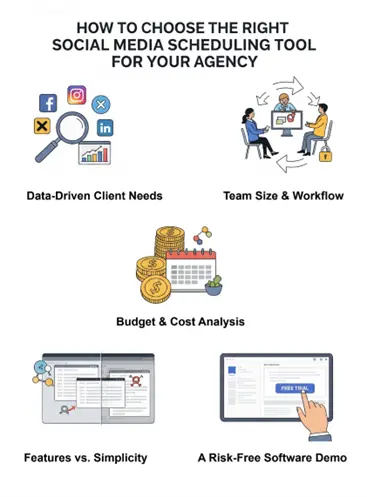
How To Choose The Right Social Media Scheduling Tool For Your Agency?
Here are some simple steps to help you choose the right social media scheduling tool for your digital marketing agency.
Still Posting Manually? Let These Tools Do The Work
Social media scheduling tools are not just a nice-to-have tool, they are a must. Juggling between multiple clients, platforms, and content calendars without a smart tool is like trying to herd cats with a spaghetti noodle.
Choosing the right scheduling tool is like picking the right shoes for a marathon. You want something that fits, supports your goals, and helps you with –
- Saving time by planning posts in advance instead of scrambling every day
- Staying organized with calendars, approvals, and team workflows
- Delivering better results by posting consistently and analyzing what works
The best part is happy clients because when their social media looks polished and performs well, they will trust you more, and that means more business for your agency.
So, pick smart, post smarter, and let your social media game shine.